Custom Cameras
Text:
In GTA V, the game world is rendered through a camera object — a virtual point in 3D space with a position, rotation, and field of view. By default the game manages this camera for you, but through scripting you can create your own camera, take control of the rendering pipeline, and point it wherever you like. This opens up a whole range of photographic possibilities: fixed surveillance angles, smooth cinematic moves, or fully free-roam camera systems independent of the player character.
Defining a Camera
A camera in GTA V is represented by the
-
- Position
— a `Vector3` describing where in the world the camera sits -
- Rotation
— a `Vector3` of Euler angles (pitch, yaw, roll) in degrees -
- FieldOfView
— a `float` controlling the lens angle, where smaller values zoom in and larger values zoom out
You create a camera with- World.CreateCamera
, passing an initial position, rotation, and field of view. To make it the camera the game actually renders from, you assign it to- World.RenderingCamera
. To return to the default game camera, set- World.RenderingCamera
back to `null`.
// Create a camera at a given position, rotation, and field of view (FOV)
Camera myCamera = World.CreateCamera(position, rotation, fov);

// Make it the active rendering camera
myCamera.IsActive = true;
World.RenderingCamera = myCamera;

// Return to the default game camera
World.RenderingCamera = null;
myCamera.IsActive = false;
myCamera.Delete();
It is important to call
Setting Up a Static Camera
The simplest use of a custom camera is a fixed, static shot that always points at the player. We toggle it on and off with the G key. When activated, the camera is placed a few metres in front of the player using Tick event it continuously calls
The key functions used here are:
-
- World.CreateCamera(Vector3 position, Vector3 rotation, float fov)
— creates and returns a new Camera object -
- myCamera.IsActive
— set to `true` to activate, `false` to deactivate -
- World.RenderingCamera
— assign your camera here to take over rendering -
- myCamera.PointAt(Vector3 target)
— rotates the camera to face a world position -
- Game.Player.Character.GetOffsetPosition(Vector3 offset)
— returns a world position offset relative to the player's local axes
private void onTick(object sender, EventArgs e)
{
    if (myCamera != null && myCamera.IsActive)
    {
        // Keep pointing at the player every frame
        myCamera.PointAt(Game.Player.Character.Position);
    }
}

private void onKeyDown(object sender, KeyEventArgs e)
{
    if (e.KeyCode == Keys.G)
    {
        if (myCamera == null || !myCamera.IsActive)
        {
            Vector3 camPos = Game.Player.Character.GetOffsetPosition(new Vector3(0f, 5f, 0f));
            Vector3 camRot = new Vector3(0.0f, 0.0f, 135.9f);
            float fov = 50.0f;

            myCamera = World.CreateCamera(camPos, camRot, fov);
            myCamera.IsActive = true;
            World.RenderingCamera = myCamera;

            GTA.UI.Screen.ShowSubtitle("Custom Camera ON", 2000);
        }
        else
        {
            World.RenderingCamera = null;
            myCamera.IsActive = false;
            myCamera.Delete();
            myCamera = null;

            GTA.UI.Screen.ShowSubtitle("Custom Camera OFF", 2000);
        }
    }
}
Example code
using GTA;
using GTA.Math;
using GTA.Native;
using System;
using System.Windows.Forms;

namespace CustomCamera
{
    public class CustomCamera : Script
    {
        private Camera myCamera;

        public CustomCamera()
        {
            this.Tick += onTick;
            this.KeyDown += onKeyDown;
        }

        private void onTick(object sender, EventArgs e)
        {
            if (myCamera != null && myCamera.IsActive)
            {
                myCamera.PointAt(Game.Player.Character.Position);
            }
        }

        private void onKeyDown(object sender, KeyEventArgs e)
        {
            if (e.KeyCode == Keys.G)
            {
                if (myCamera == null || !myCamera.IsActive)
                {
                    Vector3 camPos = Game.Player.Character.GetOffsetPosition(new Vector3(0f, 5f, 0f));
                    Vector3 camRot = new Vector3(0.0f, 0.0f, 135.9f);
                    float fov = 50.0f;

                    myCamera = World.CreateCamera(camPos, camRot, fov);
                    myCamera.IsActive = true;
                    World.RenderingCamera = myCamera;

                    GTA.UI.Screen.ShowSubtitle("Custom Camera ON", 2000);
                }
                else
                {
                    World.RenderingCamera = null;
                    myCamera.IsActive = false;
                    myCamera.Delete();
                    myCamera = null;

                    GTA.UI.Screen.ShowSubtitle("Custom Camera OFF", 2000);
                }
            }
        }
    }
}
Setting Up Multiple Static Cameras
A single static camera is useful, but you can create as many cameras as you like and switch between them at runtime. You could monitor different locations in the game map, by placing cameras and switching between them.
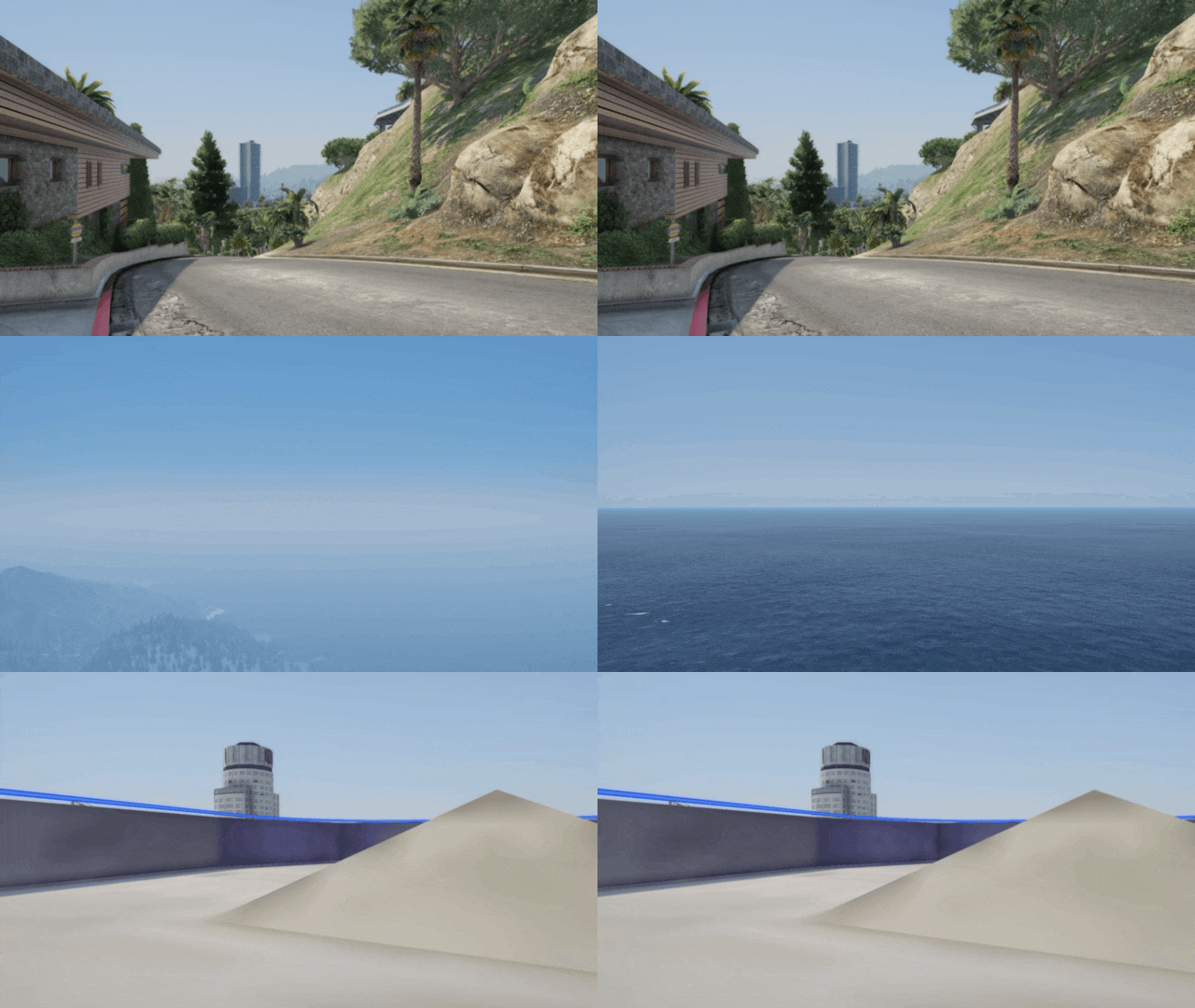
Here we set up an array of four cameras, each placed at a different offset around the player. Pressing G toggles the system on and off, and H, J, K, L switches between them.
The cameras are stored in a Camera[] array. Because only one camera can be the rendering camera at a time, switching is just a matter of reassigning
// Define four positions around the player
Vector3[] offsets = new Vector3[]
{
    new Vector3(  0f,  8f, 2f), // behind
    new Vector3(  0f, -8f, 2f), // in front
    new Vector3(  8f,  0f, 2f), // right
    new Vector3( -8f,  0f, 2f)  // left
};

cameras = new Camera[offsets.Length];
for (int i = 0; i < offsets.Length; i++)
{
    Vector3 pos = Game.Player.Character.GetOffsetPosition(offsets[i]);
    cameras[i] = World.CreateCamera(pos, Vector3.Zero, 50.0f);
    cameras[i].IsActive = true;
}

// Activate the first one
World.RenderingCamera = cameras[0];
activeCameraIndex = 0;
Example code
using GTA;
using GTA.Math;
using GTA.Native;
using System;
using System.Windows.Forms;

namespace CustomCamera
{
    public class CustomCamera : Script
    {
        private Camera[] cameras;
        private int activeCameraIndex = 0;
        private bool camerasActive = false;

        public CustomCamera()
        {
            this.Tick += onTick;
            this.KeyDown += onKeyDown;
        }

        private void onTick(object sender, EventArgs e)
        {
        }

        private void onKeyDown(object sender, KeyEventArgs e)
        {
            if (e.KeyCode == Keys.G)
            {
                if (!camerasActive)
                {
                    Vector3[] offsets = new Vector3[]
                    {
                        new Vector3(  0f,  8f, 2f),
                        new Vector3(  0f, -8f, 2f),
                        new Vector3(  8f,  0f, 2f),
                        new Vector3( -8f,  0f, 2f)
                    };

                    cameras = new Camera[offsets.Length];
                    for (int i = 0; i < offsets.Length; i++)
                    {
                        Vector3 pos = Game.Player.Character.GetOffsetPosition(offsets[i]);
                        cameras[i] = World.CreateCamera(pos, Vector3.Zero, 50.0f);
                        cameras[i].IsActive = true;
                    }

                    activeCameraIndex = 0;
                    World.RenderingCamera = cameras[activeCameraIndex];
                    camerasActive = true;

                    GTA.UI.Screen.ShowSubtitle("Cameras ON — press H J K L to switch", 2000);
                }
                else
                {
                    World.RenderingCamera = null;
                    foreach (Camera cam in cameras)
                    {
                        if (cam != null) { cam.IsActive = false; cam.Delete(); }
                    }
                    cameras = null;
                    camerasActive = false;

                    GTA.UI.Screen.ShowSubtitle("Cameras OFF", 2000);
                }
            }

            // Switch between cameras with H J K L
            if (camerasActive && cameras != null)
            {
                int index = -1;
                if (e.KeyCode == Keys.H) index = 0;
                if (e.KeyCode == Keys.J) index = 1;
                if (e.KeyCode == Keys.K) index = 2;
                if (e.KeyCode == Keys.L) index = 3;

                if (index >= 0)
                {
                    activeCameraIndex = index;
                    World.RenderingCamera = cameras[activeCameraIndex];
                    GTA.UI.Screen.ShowSubtitle("Camera " + (index + 1), 1000);
                }
            }
        }
    }
}
Attaching a Camera to an Entity
A camera does not have to sit at a fixed world position — it can be attached to a moving entity, riding along with it every frame. Here we spawn a cat in front of the player, give it a task to walk towards the player character, and attach a camera to the cat's body so we see the world from its perspective.
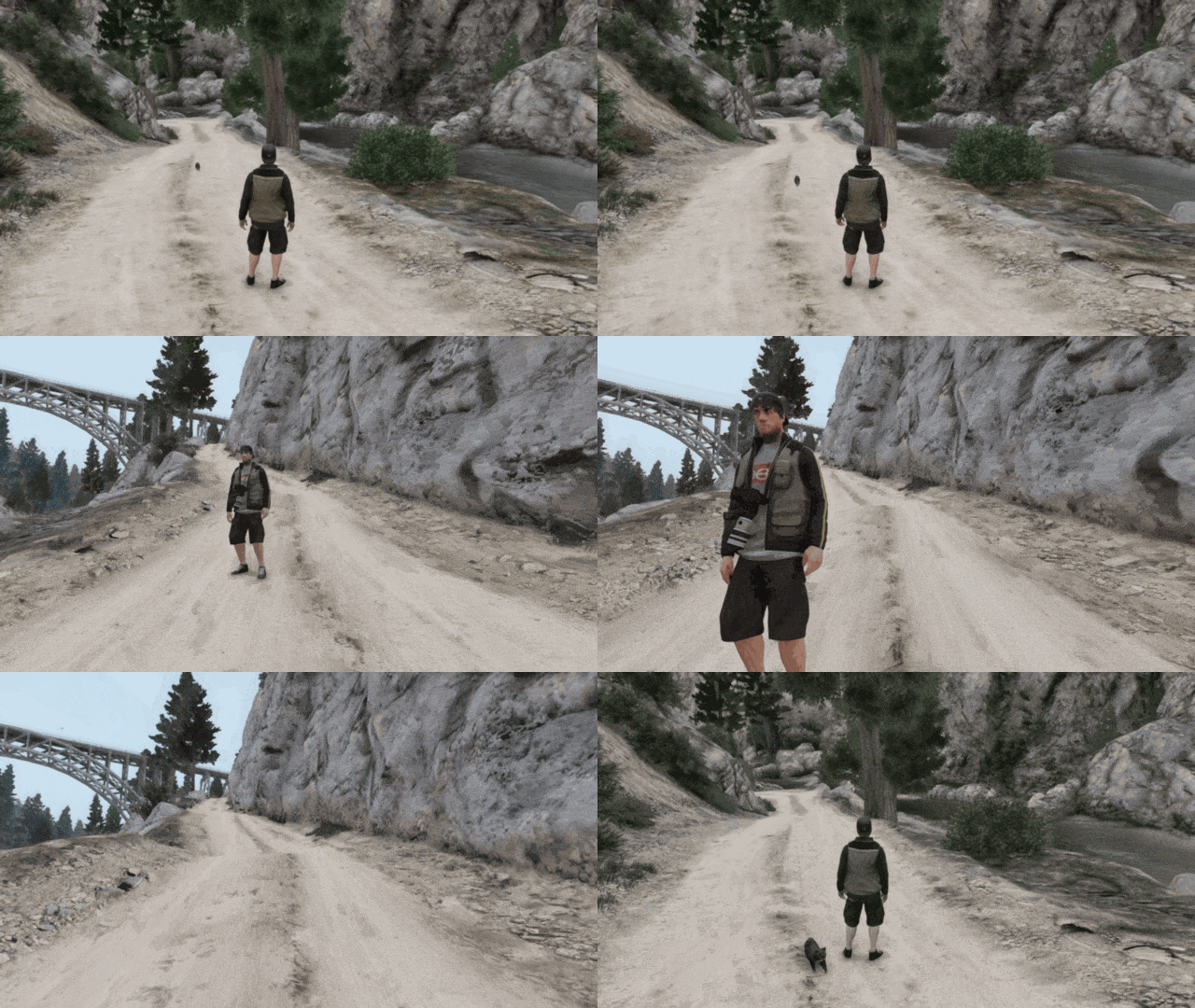
The key function is the native (0, 0, 0.3) sits just above the cat's origin regardless of which way the cat is facing.
To spawn the cat we use PedHash.Cat, placed a few metres in front of the player. We then request the model, wait for it to load, and spawn the ped. To make the cat walk towards the player we use the native
// Spawn a cat 5 metres in front of the player
Model catModel = PedHash.Cat;
catModel.Request(500);
Vector3 spawnPos = Game.Player.Character.GetOffsetPosition(new Vector3(0f, 5f, 0f));
Ped cat = World.CreatePed(catModel, spawnPos);

// Task the cat to walk towards the player
Function.Call(Hash.TASK_GO_TO_ENTITY,
    cat,                          // the ped
    Game.Player.Character,        // target entity
    -1,                           // duration (-1 = until cancelled)
    1.5f,                         // stopping distance in metres
    1.0f,                         // movement speed (1 = walk)
    1073741824,                   // flags
    0                             // unknown
);

// Create a camera and attach it to the cat
catCamera = World.CreateCamera(Vector3.Zero, Vector3.Zero, 60.0f);
catCamera.IsActive = true;
World.RenderingCamera = catCamera;

Function.Call(Hash.ATTACH_CAM_TO_ENTITY,
    catCamera,   // the camera
    cat,         // entity to attach to
    0f, 0f, 0.3f,  // offset (x, y, z) in entity-local space
    true         // inherit entity rotation
);
Because the camera is attached to the entity, you do not need to update its position in Tick — the game engine does that automatically every frame. Press G to spawn the cat and activate the view, and press G again to delete everything and return to the default camera.
Example code
using GTA;
using GTA.Math;
using GTA.Native;
using System;
using System.Windows.Forms;

namespace CustomCamera
{
    public class CustomCamera : Script
    {
        private Camera catCamera;
        private Ped cat;

        public CustomCamera()
        {
            this.Tick += onTick;
            this.KeyDown += onKeyDown;
        }

        private void onTick(object sender, EventArgs e)
        {
            // Nothing needed — ATTACH_CAM_TO_ENTITY handles position every frame
        }

        private void onKeyDown(object sender, KeyEventArgs e)
        {
            if (e.KeyCode == Keys.G)
            {
                if (catCamera == null || !catCamera.IsActive)
                {
                    // Request and load the cat model
                    Model catModel = PedHash.Cat;
                    catModel.Request(500);

                    // Spawn cat 5 metres in front of the player
                    Vector3 spawnPos = Game.Player.Character.GetOffsetPosition(new Vector3(0f, 5f, 0f));
                    cat = World.CreatePed(catModel, spawnPos);
                    catModel.MarkAsNoLongerNeeded();

                    // Task cat to walk towards the player
                    Function.Call(Hash.TASK_GO_TO_ENTITY,
                        cat,
                        Game.Player.Character,
                        -1,
                        1.5f,
                        1.0f,
                        1073741824,
                        0
                    );

                    // Create camera and attach to the cat
                    catCamera = World.CreateCamera(Vector3.Zero, Vector3.Zero, 60.0f);
                    catCamera.IsActive = true;
                    World.RenderingCamera = catCamera;

                    Function.Call(Hash.ATTACH_CAM_TO_ENTITY,
                        catCamera,
                        cat,
                        0f, 0f, 0.3f,
                        true
                    );

                    GTA.UI.Screen.ShowSubtitle("Cat Camera ON", 2000);
                }
                else
                {
                    // Detach and clean up
                    Function.Call(Hash.DETACH_CAM, catCamera);
                    World.RenderingCamera = null;
                    catCamera.IsActive = false;
                    catCamera.Delete();
                    catCamera = null;

                    if (cat != null && cat.Exists())
                        cat.Delete();
                    cat = null;

                    GTA.UI.Screen.ShowSubtitle("Cat Camera OFF", 2000);
                }
            }
        }
    }
}
Moving the Camera with Game Controls
A static camera is a starting point, but what makes a custom camera really useful is the ability to fly it through the scene. We can read the player's analogue inputs — the same thumbstick or WASD inputs the game normally uses for character movement and look — and apply them to the camera instead.
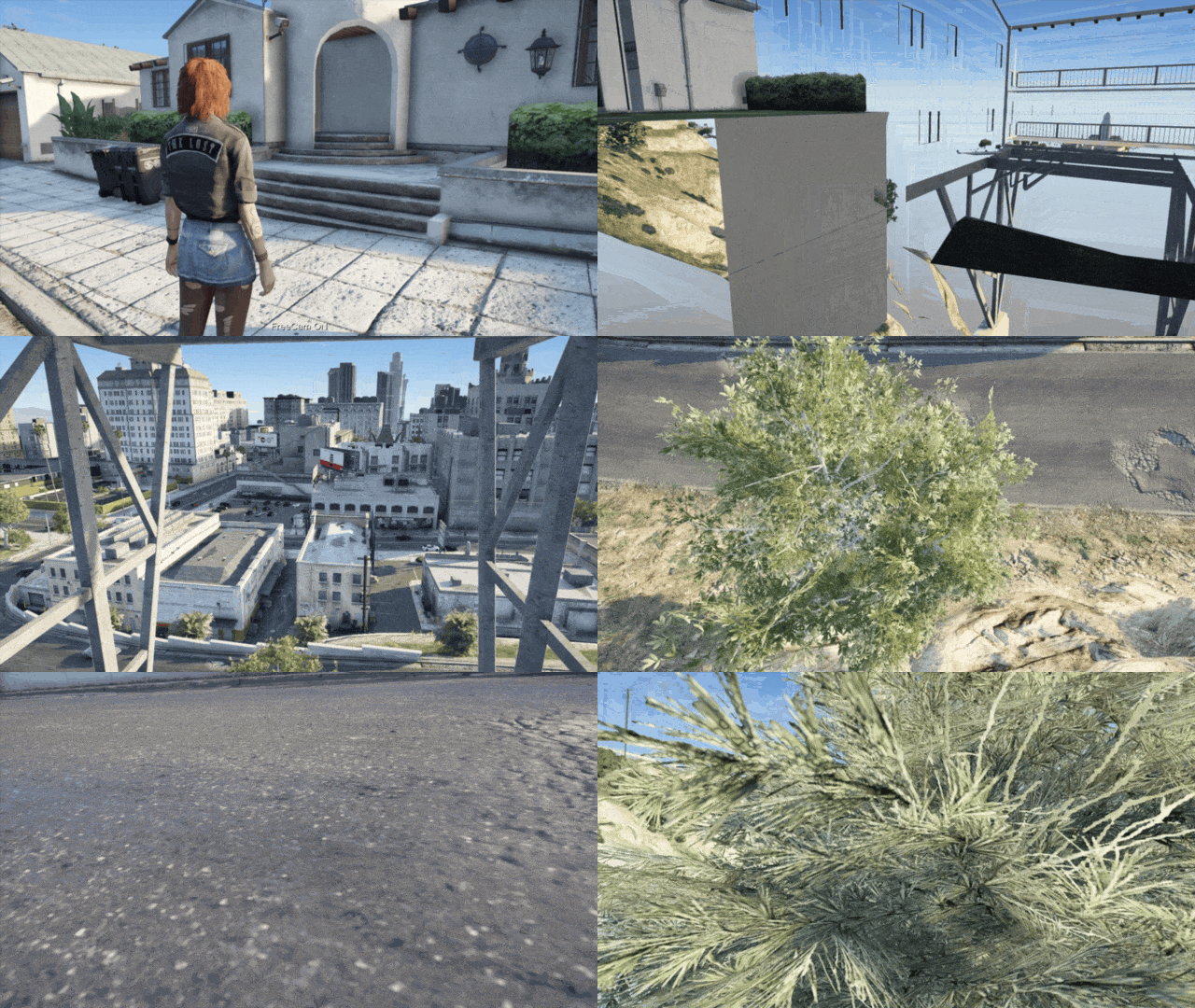
To prevent those inputs from also controlling the character, we call
Camera movement is computed in camera-local space: by using
private void UpdateCustomCamera()
{
    float deltaTime = Game.LastFrameTime;
    float camSpeed = 1f * deltaTime;
    float camRotSpeed = 80f * deltaTime;

    Game.DisableAllControlsThisFrame();

    Vector3 camForward = myCamera.Direction.Normalized;
    Vector3 camRight = Vector3.Cross(Vector3.WorldUp, camForward);

    float fbSpeedMult = Function.Call<float>(Hash.GET_DISABLED_CONTROL_NORMAL, 2, Control.MoveUpDown);
    float lrSpeedMult = Function.Call<float>(Hash.GET_DISABLED_CONTROL_NORMAL, 2, Control.MoveLeftRight);
    float yawSpeedMult = Function.Call<float>(Hash.GET_DISABLED_CONTROL_NORMAL, 2, Control.LookLeftRight);
    float pitchSpeedMult = -1 * Function.Call<float>(Hash.GET_DISABLED_CONTROL_NORMAL, 2, Control.LookUpDown);

    Vector3 camMove = (camRight * -lrSpeedMult + camForward * -fbSpeedMult) * camSpeed;
    Vector3 camRot = new Vector3(pitchSpeedMult * camRotSpeed, 0, -yawSpeedMult * camRotSpeed);

    myCamera.Position += camMove;
    myCamera.Rotation += camRot;
}
Example code
using GTA;
using GTA.Math;
using GTA.Native;
using System;
using System.Windows.Forms;
using Control = GTA.Control;

namespace CustomCamera
{
    public class CustomCamera : Script
    {
        private Camera myCamera;

        public CustomCamera()
        {
            this.Tick += onTick;
            this.KeyDown += onKeyDown;
        }

        private void onTick(object sender, EventArgs e)
        {
            if (myCamera != null && myCamera.IsActive)
            {
                UpdateCustomCamera();
            }
        }

        private void UpdateCustomCamera()
        {
            float deltaTime = Game.LastFrameTime;
            float camSpeed = 1f * deltaTime;
            float camRotSpeed = 80f * deltaTime;

            Game.DisableAllControlsThisFrame();

            Vector3 camForward = myCamera.Direction.Normalized;
            Vector3 camRight = Vector3.Cross(Vector3.WorldUp, camForward);
            Vector3 camUp = Vector3.Cross(camRight, camForward);

            float fbSpeedMult = Function.Call<float>(Hash.GET_DISABLED_CONTROL_NORMAL, 2, Control.MoveUpDown);
            float lrSpeedMult = Function.Call<float>(Hash.GET_DISABLED_CONTROL_NORMAL, 2, Control.MoveLeftRight);
            float yawSpeedMult = Function.Call<float>(Hash.GET_DISABLED_CONTROL_NORMAL, 2, Control.LookLeftRight);
            float pitchSpeedMult = -1 * Function.Call<float>(Hash.GET_DISABLED_CONTROL_NORMAL, 2, Control.LookUpDown);

            Vector3 camMove = (camRight * -lrSpeedMult + camForward * -fbSpeedMult) * camSpeed;
            Vector3 camRot = new Vector3(pitchSpeedMult * camRotSpeed, 0, -yawSpeedMult * camRotSpeed);

            myCamera.Position += camMove;
            myCamera.Rotation += camRot;
        }

        private void onKeyDown(object sender, KeyEventArgs e)
        {
            if (e.KeyCode == Keys.G)
            {
                if (myCamera == null || !myCamera.IsActive)
                {
                    Vector3 camPos = Game.Player.Character.GetOffsetPosition(new Vector3(0f, 5f, 0f));
                    Vector3 camRot = new Vector3(0.0f, 0.0f, 135.9f);
                    float fov = 50.0f;

                    myCamera = World.CreateCamera(camPos, camRot, fov);
                    myCamera.IsActive = true;
                    World.RenderingCamera = myCamera;

                    GTA.UI.Screen.ShowSubtitle("Custom Camera ON", 2000);
                }
                else
                {
                    World.RenderingCamera = null;
                    myCamera.IsActive = false;
                    myCamera.Delete();
                    myCamera = null;

                    GTA.UI.Screen.ShowSubtitle("Custom Camera OFF", 2000);
                }
            }
        }
    }
}
Moving the Camera with Custom Keys
Using the game's built-in controls works, but it ties camera movement to the same inputs used for gameplay, which can cause conflicts. A cleaner approach is to read keyboard keys directly with
In this version the camera is moved with I / K (forward/back), J / L (left/right), and U / O (up/down). Holding Shift switches from a slow precise speed to a faster one. Mouse movement is read each frame using LookLeftRight and LookUpDown controls — these values reflect actual mouse delta regardless of whether other controls are disabled.
Vertical rotation is clamped to ±89° to prevent the camera from flipping upside down.
The properties Vector3 values, which makes it straightforward to translate key presses into world-space movement.
// Movement: read each axis key and offset position along camera-local vectors
if (Game.IsKeyPressed(Keys.I)) camPos += camForward * moveSpeed;
if (Game.IsKeyPressed(Keys.K)) camPos -= camForward * moveSpeed;
if (Game.IsKeyPressed(Keys.J)) camPos -= camRight  * moveSpeed;
if (Game.IsKeyPressed(Keys.L)) camPos += camRight  * moveSpeed;
if (Game.IsKeyPressed(Keys.U)) camPos += camUp     * moveSpeed;
if (Game.IsKeyPressed(Keys.O)) camPos -= camUp     * moveSpeed;
myCamera.Position = camPos;

// Rotation: read mouse delta and apply to yaw (Z) and pitch (X)
float mouseX = Function.Call<float>(Hash.GET_CONTROL_NORMAL, 0, Control.LookLeftRight) * mouseSensitivityX;
float mouseY = Function.Call<float>(Hash.GET_CONTROL_NORMAL, 0, Control.LookUpDown)    * mouseSensitivityY;

Vector3 cameraRotation = myCamera.Rotation;
cameraRotation.Z -= mouseX;
cameraRotation.X -= mouseY;
cameraRotation.X = Clamp(cameraRotation.X, -89f, 89f);
myCamera.Rotation = cameraRotation;
Example code
using GTA;
using GTA.Math;
using GTA.Native;
using System;
using System.Windows.Forms;
using Control = GTA.Control;

namespace CustomCamera
{
    public class CustomCamera : Script
    {
        private Camera myCamera;
        private float moveSpeed;
        private float slowMoveSpeed = 0.05f;
        private float fastMoveSpeed = 3f;
        private float mouseSensitivityX = 3.0f;
        private float mouseSensitivityY = 3.0f;

        public CustomCamera()
        {
            this.Tick += onTick;
            this.KeyDown += onKeyDown;
        }

        private void onTick(object sender, EventArgs e)
        {
            if (myCamera != null && myCamera.IsActive)
            {
                UpdateCustomCamera();
            }
        }

        private void UpdateCustomCamera()
        {
            moveSpeed = Game.IsKeyPressed(Keys.ShiftKey) ? fastMoveSpeed : slowMoveSpeed;

            Vector3 camPos     = myCamera.Position;
            Vector3 camForward = myCamera.ForwardVector;
            Vector3 camRight   = myCamera.RightVector;
            Vector3 camUp      = myCamera.UpVector;

            if (Game.IsKeyPressed(Keys.I)) camPos += camForward * moveSpeed;
            if (Game.IsKeyPressed(Keys.K)) camPos -= camForward * moveSpeed;
            if (Game.IsKeyPressed(Keys.J)) camPos -= camRight   * moveSpeed;
            if (Game.IsKeyPressed(Keys.L)) camPos += camRight   * moveSpeed;
            if (Game.IsKeyPressed(Keys.U)) camPos += camUp      * moveSpeed;
            if (Game.IsKeyPressed(Keys.O)) camPos -= camUp      * moveSpeed;
            myCamera.Position = camPos;

            float mouseX = Function.Call<float>(Hash.GET_CONTROL_NORMAL, 0, Control.LookLeftRight) * mouseSensitivityX;
            float mouseY = Function.Call<float>(Hash.GET_CONTROL_NORMAL, 0, Control.LookUpDown)    * mouseSensitivityY;

            Vector3 cameraRotation = myCamera.Rotation;
            cameraRotation.Z -= mouseX;
            cameraRotation.X -= mouseY;
            cameraRotation.X  = Clamp(cameraRotation.X, -89f, 89f);
            myCamera.Rotation = cameraRotation;
        }

        private float Clamp(float value, float min, float max)
        {
            return (value < min) ? min : (value > max) ? max : value;
        }

        private void onKeyDown(object sender, KeyEventArgs e)
        {
            if (e.KeyCode == Keys.G)
            {
                if (myCamera == null || !myCamera.IsActive)
                {
                    Vector3 camPos = Game.Player.Character.GetOffsetPosition(new Vector3(0f, 5f, 0f));
                    Vector3 camRot = new Vector3(0.0f, 0.0f, 135.9f);
                    float fov = 50.0f;

                    myCamera = World.CreateCamera(camPos, camRot, fov);
                    myCamera.IsActive = true;
                    World.RenderingCamera = myCamera;

                    GTA.UI.Screen.ShowSubtitle("Custom Camera ON", 2000);
                }
                else
                {
                    World.RenderingCamera = null;
                    myCamera.IsActive = false;
                    myCamera.Delete();
                    myCamera = null;

                    GTA.UI.Screen.ShowSubtitle("Custom Camera OFF", 2000);
                }
            }
        }
    }
}
Recording a Camera Travel Path
So far the camera responds to live input. For cinematic photography you often want a predetermined move: the camera travels smoothly from point A to point B over a set duration, without you touching the controls. This is sometimes called a camera dolly or travel path.
The technique uses linear interpolation for position and spherical linear interpolation (Slerp) for rotation. Lerp moves position at a constant rate between two Vector3 values. Slerp does the same for rotation but treats it as a quaternion, which produces a smooth arc through 3D orientations rather than the abrupt, gimbal-prone results you get from lerping Euler angles directly.
Because GTA V's camera uses Euler angles but quaternion Slerp requires quaternions, we convert using t by dividing by the total duration.
if (isTravelling)
{
    traveTime += Game.LastFrameTime;
    float t = Math.Min(traveTime / travelDuration, 1.0f);

    // Lerp position
    myCamera.Position = Vector3.Lerp(startPos, endPos, t);

    // Slerp rotation via quaternions for a smooth arc
    Quaternion startQuat = Quaternion.Euler(startRot);
    Quaternion endQuat   = Quaternion.Euler(endRot);
    myCamera.Rotation    = QuaternionToEuler(Quaternion.Slerp(startQuat, endQuat, t));

    if (t >= 1.0f)
    {
        isTravelling = false;
        GTA.UI.Screen.ShowSubtitle("Camera Travel Completed", 2000);
    }
    return; // skip manual controls while travelling
}
The key bindings added in the version below are:
| Key | Action |
|---|---|
G |
Toggle custom camera on / off |
B |
Save current position and rotation as start |
N |
Save current position and rotation as end |
H |
Begin the camera travel |
Example code
using GTA;
using GTA.Math;
using GTA.Native;
using System;
using System.Windows.Forms;
using Control = GTA.Control;

namespace CustomCamera
{
    public class CustomCamera : Script
    {
        private Camera myCamera;
        private float moveSpeed;
        private float slowMoveSpeed = 0.05f;
        private float fastMoveSpeed = 3f;
        private float mouseSensitivityX = 3.0f;
        private float mouseSensitivityY = 3.0f;

        private Vector3 startPos;
        private Vector3 endPos;
        private Vector3 startRot;
        private Vector3 endRot;
        private float travelDuration = 5f;
        private float traveTime = 0f;
        private bool isTravelling = false;

        public CustomCamera()
        {
            this.Tick += onTick;
            this.KeyDown += onKeyDown;
        }

        private void onTick(object sender, EventArgs e)
        {
            if (myCamera != null && myCamera.IsActive)
            {
                UpdateCustomCamera();
            }
        }

        private void UpdateCustomCamera()
        {
            if (isTravelling)
            {
                traveTime += Game.LastFrameTime;
                float t = traveTime / travelDuration;
                if (t > 1.0f) t = 1.0f;

                myCamera.Position = Vector3.Lerp(startPos, endPos, t);

                Quaternion startQuat = Quaternion.Euler(startRot);
                Quaternion endQuat   = Quaternion.Euler(endRot);
                myCamera.Rotation    = QuaternionToEuler(Quaternion.Slerp(startQuat, endQuat, t));

                if (t >= 1.0f)
                {
                    isTravelling = false;
                    GTA.UI.Screen.ShowSubtitle("Camera Travel Completed", 2000);
                }
                return;
            }

            moveSpeed = Game.IsKeyPressed(Keys.ShiftKey) ? fastMoveSpeed : slowMoveSpeed;

            Vector3 camPos     = myCamera.Position;
            Vector3 camForward = myCamera.ForwardVector;
            Vector3 camRight   = myCamera.RightVector;
            Vector3 camUp      = myCamera.UpVector;

            if (Game.IsKeyPressed(Keys.I)) camPos += camForward * moveSpeed;
            if (Game.IsKeyPressed(Keys.K)) camPos -= camForward * moveSpeed;
            if (Game.IsKeyPressed(Keys.J)) camPos -= camRight   * moveSpeed;
            if (Game.IsKeyPressed(Keys.L)) camPos += camRight   * moveSpeed;
            if (Game.IsKeyPressed(Keys.U)) camPos += camUp      * moveSpeed;
            if (Game.IsKeyPressed(Keys.O)) camPos -= camUp      * moveSpeed;
            myCamera.Position = camPos;

            float mouseX = Function.Call<float>(Hash.GET_CONTROL_NORMAL, 0, Control.LookLeftRight) * mouseSensitivityX;
            float mouseY = Function.Call<float>(Hash.GET_CONTROL_NORMAL, 0, Control.LookUpDown)    * mouseSensitivityY;

            Vector3 cameraRotation = myCamera.Rotation;
            cameraRotation.Z -= mouseX;
            cameraRotation.X -= mouseY;
            cameraRotation.X  = Clamp(cameraRotation.X, -89f, 89f);
            myCamera.Rotation = cameraRotation;
        }

        private float Clamp(float value, float min, float max)
        {
            return (value < min) ? min : (value > max) ? max : value;
        }

        private Vector3 QuaternionToEuler(Quaternion q)
        {
            Vector3 angles = new Vector3();

            float sinrCosp = 2 * (q.W * q.X + q.Y * q.Z);
            float cosrCosp = 1 - 2 * (q.X * q.X + q.Y * q.Y);
            angles.X = (float)Math.Atan2(sinrCosp, cosrCosp);

            float sinp = 2 * (q.W * q.Y - q.Z * q.X);
            if (Math.Abs(sinp) >= 1)
                angles.Y = (float)CopySign((float)(Math.PI / 2), sinp);
            else
                angles.Y = (float)Math.Asin(sinp);

            float sinyCosp = 2 * (q.W * q.Z + q.X * q.Y);
            float cosyCosp = 1 - 2 * (q.Y * q.Y + q.Z * q.Z);
            angles.Z = (float)Math.Atan2(sinyCosp, cosyCosp);

            angles = angles * (180.0f / (float)Math.PI);
            return angles;
        }

        private float CopySign(float magnitude, float sign)
        {
            return (sign >= 0) ? Math.Abs(magnitude) : -Math.Abs(magnitude);
        }

        private void onKeyDown(object sender, KeyEventArgs e)
        {
            if (e.KeyCode == Keys.G)
            {
                if (myCamera == null || !myCamera.IsActive)
                {
                    Vector3 camPos = Game.Player.Character.GetOffsetPosition(new Vector3(0f, 5f, 0f));
                    Vector3 camRot = new Vector3(0.0f, 0.0f, 135.9f);
                    float fov = 50.0f;

                    myCamera = World.CreateCamera(camPos, camRot, fov);
                    myCamera.IsActive = true;
                    World.RenderingCamera = myCamera;

                    GTA.UI.Screen.ShowSubtitle("Custom Camera ON", 2000);

                    startPos = Game.Player.Character.Position;
                    endPos   = camPos;
                }
                else
                {
                    World.RenderingCamera = null;
                    myCamera.IsActive = false;
                    myCamera.Delete();
                    myCamera = null;

                    GTA.UI.Screen.ShowSubtitle("Custom Camera OFF", 2000);
                }
            }
            if (e.KeyCode == Keys.B && myCamera != null && myCamera.IsActive)
            {
                startPos = myCamera.Position;
                startRot = myCamera.Rotation;
                GTA.UI.Screen.ShowSubtitle("Camera Start Position Saved", 2000);
            }
            if (e.KeyCode == Keys.N && myCamera != null && myCamera.IsActive)
            {
                endPos = myCamera.Position;
                endRot = myCamera.Rotation;
                GTA.UI.Screen.ShowSubtitle("Camera End Position Saved", 2000);
            }
            if (e.KeyCode == Keys.H && myCamera != null && myCamera.IsActive)
            {
                traveTime    = 0f;
                isTravelling = true;
                GTA.UI.Screen.ShowSubtitle("Camera Travel Started", 2000);
            }
        }
    }
}